
Choosing the right web host for your website is a crucial decision that can affect your website’s performance, user experience, and long-term growth. Two major players in the web hosting industry are Hostinger and Bluehost. Both offer a range of hosting services, from shared hosting to VPS and cloud hosting, but they cater to slightly different audiences. This comparison will guide you through everything you need to know to make an informed decision.
Hostinger vs Bluehost: Quick Summary
- Hostinger stands out for its affordability, modern tools, and excellent performance, especially in budget hosting. It’s great for beginners and small businesses, offering easy setup and excellent AI-driven tools.
- Bluehost, on the other hand, is a WordPress.org-recommended host with a reputation for reliability, robust customer support, and strong performance in managed WordPress hosting. It tends to be pricier, but it’s ideal for users who need a dependable, full-featured hosting platform with premium features.
Hostinger vs Bluehost: Overview
Hostinger Profile
Founded in 2004, Hostinger has grown into a global hosting provider known for its affordability and performance. With a focus on budget-conscious users, Hostinger provides a wide range of hosting options, including shared hosting, cloud hosting, VPS hosting, and even Minecraft hosting.
The company operates from 10 data centers worldwide, ensuring solid server performance. Hostinger offers its users hPanel, a clean, intuitive control panel designed to make hosting simple for beginners while still offering the depth that more advanced users might need.
Recently, Hostinger has leaned into AI, with tools like an AI website builder and app creator, further enhancing its user experience. Whether you’re launching a small blog or a large website, Hostinger offers something for everyone at a fraction of the cost.
Bluehost Profile

Bluehost has been around since 2003 and is one of the oldest names in web hosting. The company is based in the U.S. and is known for its strong reputation, especially within the WordPress community, as it has been a recommended WordPress host since 2005.
Bluehost is now owned by Newfold Digital, and it offers a wide range of hosting plans, from shared hosting to dedicated hosting, including cloud services, WooCommerce hosting, and email marketing solutions. Its main claim to fame, though, is its integration with WordPress, making it an ideal choice for WordPress users.
As part of its ongoing growth, Bluehost migrated its infrastructure to Oracle Cloud to enhance performance, security, and reliability. This migration makes Bluehost a strong contender for users who need top-tier performance with solid support.
1. Hosting Features and Services Comparison
When choosing a hosting provider, the range of features they offer is critical. Both Hostinger and Bluehost provide impressive feature sets, but they cater to slightly different needs.
Hostinger Features
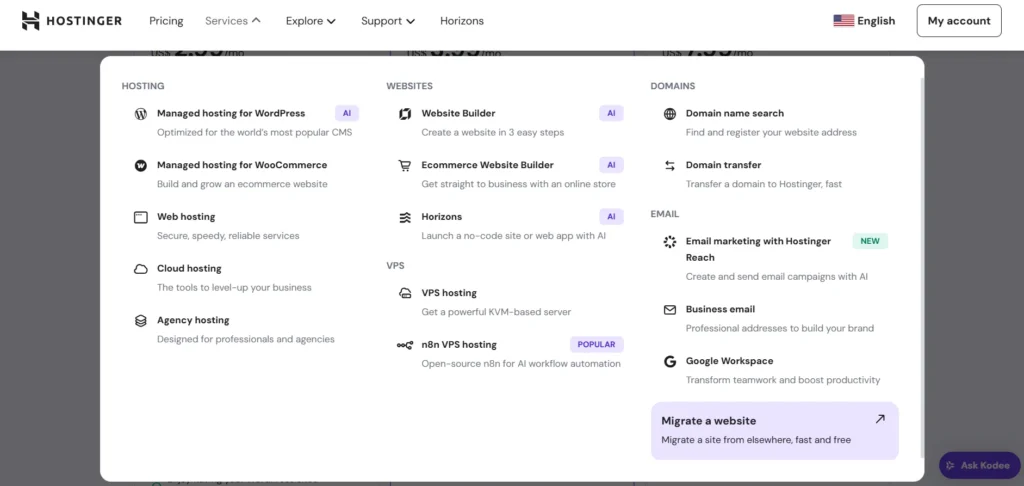
Hostinger’s features are designed to cater to beginners and those looking for affordable yet robust hosting solutions. Some of the standout features include:
- hPanel: Hostinger’s custom control panel, which is designed to be easy to use for beginners. It’s an intuitive, streamlined version of cPanel, providing all the essential tools without any extra complexity.
- Free Domain: Hostinger offers a free domain with most plans, which can save you up to $15 per year.
- Website Builder: With Hostinger’s AI Website Builder, even those without coding knowledge can create professional websites quickly and easily.
- AI Integration: Hostinger has integrated AI into its services. From website building to logo creation and email marketing, the tools make creating and managing a website easier than ever before.
- Backup and Security: Hostinger includes free daily or weekly backups (depending on the plan) and SSL certificates for all websites, adding an extra layer of security.
- Global Data Centers: Hostinger operates 10 data centers worldwide, ensuring your website loads quickly for visitors no matter where they are located.
Bluehost Features

Bluehost also offers a comprehensive set of features, but with a stronger emphasis on WordPress hosting. Some key features include:
- cPanel: Bluehost uses the popular cPanel interface, which is well-known and widely used by webmasters. It’s perfect for users who prefer a more traditional interface compared to Hostinger’s hPanel.
- WordPress Integration: As the official hosting partner for WordPress, Bluehost offers seamless WordPress integration. The setup process for WordPress is quick and simple, and they provide specific WordPress hosting plans with features like automatic updates, enhanced security, and specialized support.
- Free Domain: Like Hostinger, Bluehost offers a free domain for the first year with most of its plans.
- 24/7 Support: Bluehost provides round-the-clock support via live chat, phone, and email. They also offer extensive knowledge base articles and video tutorials, particularly for WordPress users.
- Backup and Security: Bluehost offers CodeGuard, an automated backup service, and SSL certificates for security. You’ll also get built-in CDN and advanced security tools as part of the WordPress plans.
- Free Website Builder: Bluehost includes a website builder with all of its plans, powered by the popular platform, WordPress.
Both providers offer robust security measures, including free SSL certificates, and both offer automatic backups—though Bluehost’s backup service (CodeGuard) is an add-on at extra cost, while Hostinger includes backups for free with most plans.
2. Prices and Plans Comparison
Cost is one of the biggest factors to consider when choosing a web host. Let’s compare the pricing for shared, VPS, and cloud hosting at Hostinger and Bluehost.
1. Shared Hosting Pricing Plans Comparison
Hostinger Shared Hosting & Managed WordPress Hosting
- Single Shared Hosting: $1.99/month for 48 months (renews at $7.99/month). Includes 1 website, 30 GB SSD storage, and 1 email account.
- Premium Shared Hosting: $2.99/month for 48 months (renews at $9.99/month). Includes 25 websites, 100 GB SSD storage, unlimited bandwidth, free email accounts, and weekly backups.
- Business Shared Hosting: $3.99/month for 48 months (renews at $12.99/month). Includes 50 websites, 200 GB SSD storage, free CDN, daily backups, and a unique IP.
Hostinger’s prices are very affordable, especially for users who are just getting started with their website. The higher-tier plans come with additional features like free CDN and more storage.
Bluehost Shared Hosting & Managed WordPress Hosting
- Basic Plan: $2.95/month for 36 months (renews at $8.99/month). Includes 1 website, 50 GB SSD storage, free domain for 1 year, and 24/7 support.
- Plus Plan: $5.45/month for 36 months (renews at $11.99/month). Includes unlimited websites, 50 GB SSD storage, unlimited bandwidth, and free domain for 1 year.
- Choice Plus Plan: $5.45/month for 36 months (renews at $14.99/month). Includes everything in the Plus Plan, with added privacy features and automated backups.
Bluehost offers slightly higher pricing compared to Hostinger, but their plans come with unlimited websites and more features like free CDN on higher-tier plans.
Renewal Costs
Both hosts offer attractive introductory prices, but renewal costs can be significantly higher. Hostinger’s renewals can be up to 4× the introductory price, while Bluehost renews around 2.5×.
2. VPS Hosting Pricing Plans Comparison
Hostinger VPS Hosting Plans
- VPS 1: $3.99/month (renews at $8.99/month). 1 GB RAM, 1 CPU core, 20 GB SSD storage.
- VPS 2: $7.99/month (renews at $15.99/month). 2 GB RAM, 1 CPU core, 40 GB SSD storage.
- VPS 3: $15.99/month (renews at $31.99/month). 3 GB RAM, 2 CPU cores, 60 GB SSD storage.
Hostinger’s VPS hosting is some of the most affordable on the market, but the plans are technically unmanaged. Hostinger offers an AI assistant to help with setup and management, making it more user-friendly than some other unmanaged VPS plans.
Bluehost VPS Hosting Plans
- Standard Plan: $19.99/month. 2 GB RAM, 1 CPU core, 30 GB SSD storage.
- Enhanced Plan: $29.99/month. 4 GB RAM, 2 CPU cores, 60 GB SSD storage.
- Ultimate Plan: $59.99/month. 8 GB RAM, 4 CPU cores, 120 GB SSD storage.
Bluehost’s VPS hosting is priced higher than Hostinger’s, but it includes managed features and more robust support, making it a better choice for users who need a bit more hand-holding.
3. Cloud Hosting Pricing Plans Comparison
Hostinger Cloud Hosting Plans
- Cloud Startup: $7.99/month (renews at $25.99/month). Includes 100 GB SSD storage, 1 GB RAM, 2 CPU cores, and free CDN.
Bluehost Cloud Hosting Plans
- Cloud Starter: $6.95/month (renews at $14.99/month). Includes 1 website, 30 GB SSD storage, free CDN.
- Cloud Pro: $9.95/month (renews at $18.99/month). Includes 2 websites, 60 GB SSD storage, free CDN.
Both Hostinger and Bluehost offer cloud hosting that’s more powerful than their shared hosting plans. However, Hostinger offers more storage and more features for the price.
3. Website Performance Comparison (Uptime and Speed)
Uptime and speed are critical to your website’s success. Both Hostinger and Bluehost have solid reputations for performance, but let’s break it down.
Hostinger Uptime and Speed
Hostinger is known for delivering excellent performance for the price. It’s frequently praised for its solid uptime and speed, and recent tests show 99.99% uptime on average. This is a strong performance, especially considering its low cost.
Speed-wise, Hostinger offers fast load times, thanks to its use of solid-state drives (SSD) and a free CDN for higher-tier plans. This is essential for providing visitors with a smooth browsing experience.
Bluehost Uptime and Speed
Bluehost has invested heavily in performance improvements, including its move to Oracle Cloud. This transition has helped improve its speed and uptime, bringing the service closer to a 99.98% uptime rating.
For speed, Bluehost provides fast loading times, especially for WordPress websites. They also offer a built-in CDN, which helps improve site speed by distributing content across a network of servers globally.
4. Customer Support Comparison: Who’s Got Your Back?
Customer support is a crucial factor when choosing a web host. Both Hostinger and Bluehost provide excellent support, but there are a few key differences.
Hostinger Customer Support
Hostinger offers 24/7 customer support via live chat, email, and an extensive knowledge base. They are known for having a helpful, responsive support team that’s easy to reach. The addition of their AI assistant helps guide users through basic setup and troubleshooting.
Bluehost Customer Support
Bluehost’s customer support is available 24/7 through phone, live chat, and email. They also have a comprehensive knowledge base and a dedicated WordPress academy. Bluehost is particularly popular with WordPress users due to their specialized support for WordPress websites.
5. Ease of Use Comparison – Which Hosting Platform is Easier to Use?
For beginners and those who value simplicity, ease of use is essential. Let’s see how Hostinger and Bluehost compare.
Hostinger Ease of Use
Hostinger’s hPanel is designed to be simple and user-friendly. Even if you’ve never used a control panel before, you’ll find it easy to manage your hosting account, websites, and domains. The addition of AI tools like the website builder makes it even easier to create and manage your site without needing technical knowledge.
Bluehost Ease of Use
Bluehost uses cPanel, the industry-standard control panel, which many users are already familiar with. It’s a bit more feature-heavy than Hostinger’s hPanel but still relatively easy to use. Bluehost’s integration with WordPress makes it extremely beginner-friendly for WordPress users, with one-click installs and automatic updates.
6. Privacy and Security Comparison – Which Platform is More Secure?
Security and privacy are major concerns when choosing a hosting provider. Let’s see how Hostinger and Bluehost compare in this area.
Hostinger Privacy & Security
Hostinger takes security seriously and offers free SSL certificates with all plans. Additionally, it includes daily or weekly backups depending on the plan, and users can enable two-factor authentication (2FA) for added security.
Bluehost Privacy & Security
Bluehost also provides SSL certificates with all plans and automatic backups via CodeGuard (at an additional cost). Bluehost’s integration with Oracle Cloud helps enhance the platform’s security, with enterprise-level protection for your data.
7. Server Locations Comparison
The location of a hosting provider’s servers affects how quickly your website loads for visitors in different parts of the world.
Hostinger Server Locations
Hostinger operates 10 data centers worldwide, including locations in North America, Europe, Asia, and South America. This global network helps ensure fast loading times, regardless of where your visitors are located.
Bluehost Server Locations
Bluehost’s server locations are less transparent, but with their Oracle Cloud migration, their global network of data centers is continuously improving to ensure better performance and coverage.
Hostinger vs Bluehost: Final Recommendations
Why Choose Hostinger?
- Best for Budget-Conscious Users: Hostinger is an excellent choice if you’re looking for affordable hosting that doesn’t sacrifice performance or features.
- AI-Driven Tools: If you want the latest in AI-powered tools, Hostinger has integrated these technologies to help you manage your site.
- Solid Performance: You get excellent uptime and speed, especially for shared hosting and cloud hosting.
When to Consider Bluehost?
- For WordPress Users: Bluehost is a WordPress.org-recommended host and integrates seamlessly with WordPress.
- Stronger Customer Support: If you prefer managed hosting with robust customer support, Bluehost is a great choice.
- Long-Term Investment: While Bluehost can be pricier, its reliability and performance make it a long-term investment for growing websites.
Hostinger and Bluehost Alternatives
If you’re considering other options, look into these alternatives:
- SiteGround: Known for excellent customer support, performance, and reliability, especially for WordPress.
- DreamHost: Offers transparent pricing and strong customer support with great performance.
- GreenGeeks: A great choice for eco-conscious users, providing fast and secure hosting services.
- InMotion Hosting: Known for robust VPS hosting and high-end performance, ideal for developers.
The Bottom Line
Hostinger offers fantastic value for money with its affordable pricing, modern tools, and solid performance. It’s an excellent choice for budget-conscious users, especially those just starting out.
Bluehost, on the other hand, excels in performance, particularly with WordPress hosting, and provides top-notch customer support. If you’re looking for a well-established hosting provider with reliable services, Bluehost is the way to go.
Ultimately, the decision comes down to what you value most—affordability and innovation with Hostinger, or reliability and WordPress focus with Bluehost.
FAQs
Which one is faster—Hostinger or Bluehost?
Bluehost edges out slightly with Oracle Cloud, but both offer fast speeds and excellent uptime.
Who offers better support?
Bluehost is renowned for its customer support, especially for WordPress users. Hostinger also offers solid 24/7 chat support.
What about renewal prices?
Hostinger’s renewal rates can be significantly higher, so it’s important to lock in a long-term plan. Bluehost also has higher renewal rates, but they are more predictable.
Can I host multiple websites?
Yes! Hostinger offers up to 50 websites on their Business Plan, while Bluehost provides unlimited websites on their higher-tier plans.