
Building a website in today’s digital world should be simple, fast, and, most importantly, professional. Squarespace is one of the most popular website-building platforms out there, known for its beautiful templates, solid customer service, and all-in-one website building tools. With over a decade of experience in the industry, Squarespace has managed to attract a broad customer base, ranging from creative individuals to businesses looking to establish their online presence.
But does it still live up to its reputation in 2025? This comprehensive review of Squarespace will dive into all aspects of the platform, including its features, ease of use, pricing, support, and more. Let’s see if it’s still the best choice for building a website or if newer platforms have taken the spotlight.
Overview

Squarespace is an all-in-one website builder that provides everything you need to design, develop, and launch a professional website. Whether you’re a blogger, business owner, photographer, or creative, Squarespace offers templates and tools to help you create a website that looks fantastic and works well. With drag-and-drop functionality, built-in e-commerce features, and an intuitive user interface, it’s a versatile platform that aims to cater to all kinds of users.
Since its launch in 2003, Squarespace has gained a reputation for its sleek, modern designs and ease of use. The platform stands out due to its drag-and-drop builder, customizable templates, and ability to scale for more complex needs, such as launching an online store or blog.
But as we move into 2025, it’s time to evaluate whether Squarespace still deserves its place as one of the top website builders or if there are better alternatives available. In this detailed review, we’ll explore all the strengths and weaknesses of Squarespace to help you determine if it’s the right fit for you.
Squarespace at a Glance
Before we dive deep into the features and details, let’s take a quick look at Squarespace’s core offerings.
- Ease of Use: Simple drag-and-drop interface with a clean, intuitive design.
- Templates: High-quality, responsive, and beautifully designed templates, great for a range of uses.
- E-commerce: Integrated e-commerce features, making it easy to set up an online store.
- Blogging: Strong blogging functionality, including post scheduling, categories, and multimedia options.
- Customer Support: Dedicated support with a responsive team available via live chat and email.
Squarespace Pros, Cons, & Things That Could Be Better
When evaluating any product, it’s important to understand the advantages and disadvantages. Here’s a rundown of what you can expect from Squarespace.
Pros:
- Gorgeous Templates: Squarespace is known for its stunning, professional templates that are highly customizable and mobile-responsive.
- User-Friendly: The drag-and-drop interface is easy to understand and doesn’t require coding knowledge.
- All-in-One Solution: Squarespace includes hosting, security, and templates in one package, so you don’t have to worry about external integrations.
- Solid E-commerce Tools: Whether you’re selling physical products or offering services, Squarespace has robust e-commerce capabilities.
- SEO-Friendly: Squarespace offers good SEO features, including easy customization of meta titles and descriptions.
- Great Support: Squarespace’s customer service is reliable, with multiple contact options such as live chat, email, and a forum.
Cons:
- Price: Squarespace isn’t the cheapest option out there. Compared to alternatives like Wix or WordPress.com, Squarespace’s pricing starts on the higher end.
- Limited App Marketplace: While Squarespace offers integrations with some third-party tools, its marketplace isn’t as extensive as competitors like WordPress.
- Customization Can Be Tricky for Advanced Users: While customization is possible, it may require knowledge of CSS for more complex changes.
- Not Ideal for Larger E-commerce Sites: If you’re looking to scale a large online store, Squarespace might not offer all the advanced tools you need.
Things That Could Be Better:
- Steeper Learning Curve for Beginners: While Squarespace is intuitive for most users, there may still be a slight learning curve for absolute beginners.
- Limited Blogging Features for Advanced Users: While blogging on Squarespace is good, there are fewer advanced features compared to platforms like WordPress.
Templates
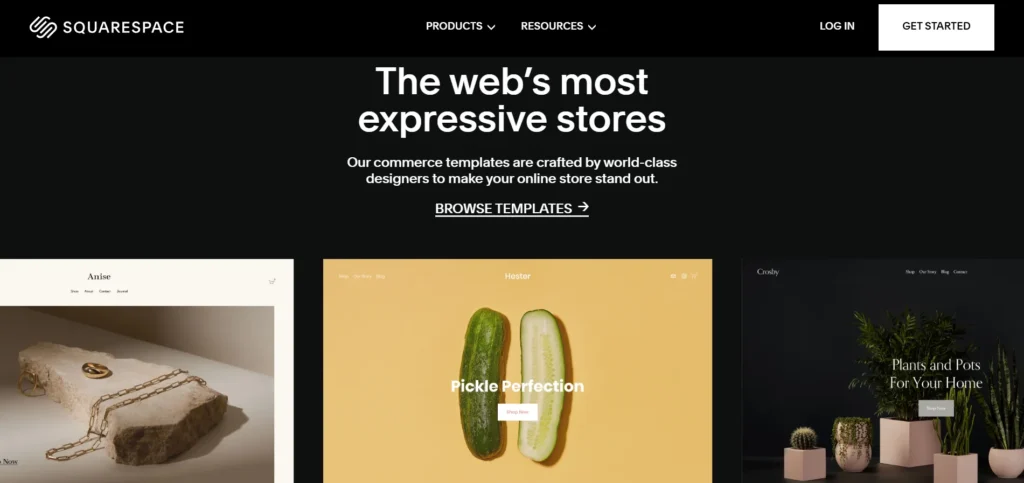
Professionally Designed, Varied, and Striking
One of the most celebrated aspects of Squarespace is its impressive range of templates. Whether you’re launching a business website, blog, or personal portfolio, Squarespace provides an extensive collection of professional templates designed by experts in web design. The best part? All templates are mobile-responsive, meaning they automatically adjust to look great on any device.
The templates are grouped by category, including:
- Business and e-commerce
- Portfolio and creative
- Blog and personal
- Nonprofit and event
Each template comes with a clean and modern design, so you don’t need to worry about making your website look dated or unprofessional. Additionally, every template is highly customizable, allowing you to tweak the layout, colors, fonts, and content to fit your style or brand.
Design and Customization
While Squarespace’s templates are a great starting point, the platform also offers flexibility when it comes to customization. You can easily modify the colors, fonts, and layout elements using the platform’s intuitive design tools. For those with some knowledge of CSS, Squarespace allows you to fine-tune your website’s design with custom code.
However, advanced users may find the lack of deep customization options to be a drawback. For example, if you’re used to working with more complex platforms like WordPress, you may feel limited by the level of customization Squarespace offers out of the box.
Features
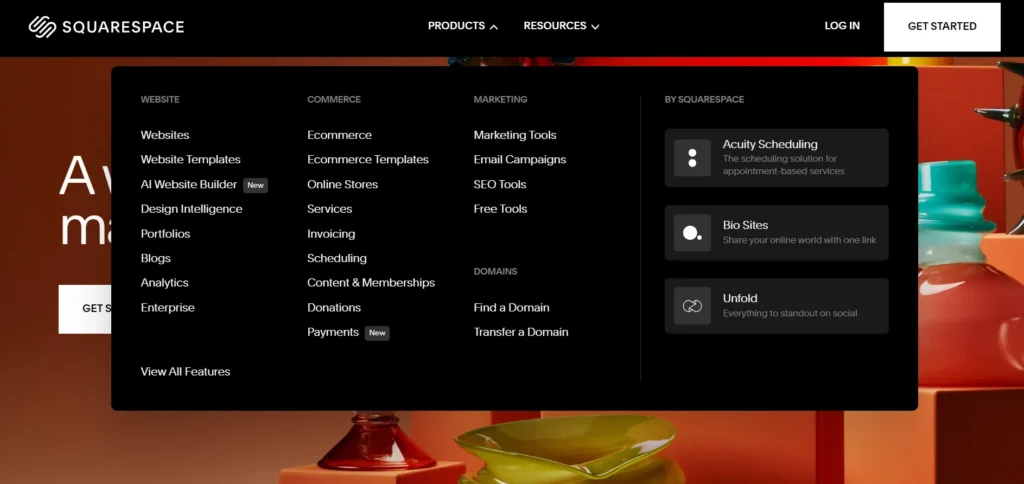
The Tools You Need to Create a Professional Website
Squarespace offers all the essential tools required to build a professional-looking website, including:
- Drag-and-Drop Builder: Easily add text, images, videos, and more using the intuitive drag-and-drop builder.
- Responsive Design: Every template is automatically optimized for mobile and tablet devices.
- Customizable Layouts: Adjust the layout and sections to fit your brand’s aesthetic.
- Analytics: Track your website’s traffic and visitor behavior using Squarespace’s built-in analytics tools.
- Image and Video Galleries: Display your content in an eye-catching way with Squarespace’s gallery options.
Create Your Own Template With Squarespace Blueprint AI
One of the most exciting features Squarespace has introduced recently is the Squarespace Blueprint, which uses artificial intelligence to help you design your website. With Blueprint, you can answer a few simple questions about your website’s goals, and the AI will suggest a custom template based on your preferences. This tool is especially useful for beginners or anyone looking to speed up the design process.
E-commerce is Kind of a Big Deal
For small businesses, Squarespace provides a comprehensive set of e-commerce tools. These tools enable you to create a fully functional online store complete with product listings, inventory management, and payment processing. You can also add promotional features like discount codes, subscriptions, and gift cards.
- Payment Methods: Squarespace integrates with major payment processors like PayPal, Stripe, and Apple Pay.
- Inventory Management: Easily track inventory, manage stock levels, and automate restocking reminders.
- Shipping: Configure shipping rates based on weight or destination, and print shipping labels directly from Squarespace.
While Squarespace is great for small to medium-sized stores, those looking to scale to larger e-commerce businesses may need to look elsewhere. For example, Squarespace’s e-commerce features might not provide all the advanced options you would get with dedicated e-commerce platforms like Shopify.
Blogging Is Pretty Solid
For bloggers, Squarespace provides a solid platform with all the features you need to create and manage your content. You can write, schedule, and publish posts, as well as organize them into categories and tags. The platform supports multimedia, so you can easily add images, videos, and audio to your blog posts.
Additionally, Squarespace provides features like social sharing, comment moderation, and email newsletters, which make it easy to grow and engage your audience. While it’s not as customizable as WordPress in terms of plugins and extensions, Squarespace provides everything a basic blogger needs to get started and maintain a successful blog.
There Are Add-ons and Third-Party Integrations Galore
Squarespace doesn’t have the same massive app marketplace as platforms like WordPress, but it does offer a solid selection of third-party integrations. These include tools for email marketing, social media sharing, analytics, and more. Integrations with services like Mailchimp, Google Analytics, and Instagram make it easy to add functionality to your website without leaving the platform.
Automate the Online Booking Process with Acuity Scheduling
For businesses that require online booking, Squarespace’s integration with Acuity Scheduling is a game-changer. With Acuity Scheduling, you can create a booking system that allows customers to book appointments, classes, or consultations directly from your website. The service syncs with your calendar and even sends automated reminders to customers.
Ease of Use
Squarespace is designed with simplicity in mind, making it accessible for both beginners and experienced users. The intuitive drag-and-drop interface allows you to easily build and customize your website without any coding knowledge. Whether you’re starting a blog, portfolio, or business site, Squarespace ensures a smooth, hassle-free experience.
My Experience With Squarespace
As someone who has worked with several website builders, I found Squarespace to be one of the easiest platforms to use. It offers a clean and user-friendly interface with a straightforward drag-and-drop builder. The setup process is intuitive, and even as a beginner, I was able to create a professional-looking site within hours.
Getting Started With Squarespace
Signing up for Squarespace was quick and easy. The platform offers a free trial, which I highly recommend before committing to a paid plan. Once I logged in, I was immediately prompted to select a template, and after that, I was able to begin customizing my website without any issues. The drag-and-drop editor made adding text, images, and sections effortless.
Customizing My Squarespace Website
I spent several hours customizing my website using Squarespace’s tools. The process was fairly simple, and I was able to adjust colors, fonts, and layouts to match my brand. The platform also allows you to embed custom code, which is great if you want to make more advanced changes. However, the lack of more advanced design controls was a bit limiting for me as someone who likes to tweak every detail.
Additional Ease of Use Features
Squarespace excels not only in design and functionality but also in providing a seamless user experience through its additional ease of use features. These tools ensure that even beginners can create a fully functional website without feeling overwhelmed. Let’s take a closer look at these convenient features.
Tutorials Abound
Squarespace offers an extensive library of tutorials and guides. Whether you need help with setting up your website, optimizing it for SEO, or configuring your online store, there’s a tutorial to guide you through every step.
Built-In Marketing, SEO, and Scheduling Tools
Squarespace’s built-in marketing tools make it easy to grow your website’s reach. You can set up email campaigns, connect your social media accounts, and create content that’s optimized for search engines. The platform also offers scheduling tools, allowing you to plan and automate social media posts.
Create Localized Versions of Your Site With Ease
Squarespace allows you to create localized versions of your site, making it easy to tailor content to different regions or languages. This feature is particularly helpful for businesses targeting an international audience or companies looking to expand into new markets.
Support

The Support Team Is Prompt and Helpful
One of the key strengths of Squarespace is its excellent customer support. I tested their live chat service, and I was impressed by how quickly I received assistance. The support agents were helpful, answering all my questions in detail and providing clear instructions for solving my issues.
Email/Ticket System
In addition to live chat, Squarespace offers an email/ticket system where you can submit support tickets for more complex issues. The team typically responds within 24 hours, and they always ensure that you get the help you need.
Live Chat
The live chat feature is highly responsive and offers real-time assistance. This is a great option if you need immediate help with your website or have quick questions.
Forum
Squarespace’s forum is another valuable resource. Here, users can exchange tips, ask questions, and share ideas. It’s a great place to find community-driven answers to your problems or learn from other users’ experiences.
Pricing
When it comes to pricing, Squarespace offers a variety of plans to suit different needs, from personal websites to larger e-commerce stores. While it may not be the cheapest option available, the platform’s robust features, seamless integration, and professional design make it a fair investment for most users.
Not the Cheapest, but a Fair Price
Squarespace’s pricing is on the higher side compared to other website builders. However, it’s important to consider what you get for the price. The platform offers four different pricing plans:
- Personal Plan: $12 per month
- Business Plan: $18 per month
- Basic E-commerce Plan: $26 per month
- Advanced E-commerce Plan: $40 per month
While Squarespace might not be the cheapest, the all-in-one nature of the platform makes it a good value for those who need a professional website with reliable customer support and built-in e-commerce features.
Squarespace REVIEW: BOTTOM LINE
Squarespace continues to be a top choice for creating a website in 2025. With beautiful templates, powerful e-commerce tools, and an easy-to-use interface, it’s perfect for anyone looking to create a professional online presence. Whether you’re a blogger, small business owner, or creative professional, Squarespace provides the tools you need to succeed.
While it’s not the cheapest platform, the value it provides in terms of design, customization, and customer support makes it well worth the investment. However, it may not be the best option for those with very specific customization needs or large e-commerce sites.
In conclusion, Squarespace still lives up to its hype and remains one of the best website builders available today.
FAQs
Is Squarespace suitable for beginners?
Yes, Squarespace is beginner-friendly. Its intuitive drag-and-drop interface makes it easy to get started.
Can I create an online store on Squarespace?
Absolutely! Squarespace offers robust e-commerce features, including inventory management, payment processing, and shipping integrations.
Does Squarespace offer SEO tools?
Yes, Squarespace provides built-in SEO tools to help optimize your website for search engines.
How much does Squarespace cost?
Pricing starts at $12 per month for personal websites and goes up to $40 per month for advanced e-commerce features.
Can I integrate third-party tools with Squarespace?
Yes, Squarespace supports integrations with several third-party tools, including Mailchimp, Google Analytics, and social media platforms.